A canvas and a workstation
Touch, pressure input, keyboards and multiple windows work together without forcing the user into separate modes.
oPad 1 · Mobile CanvasThe first oPad
oPad 1 combines a dynamic 4K high-refresh display, dual Thunderbolt 4, Miracle KeyPort and AI2-class silicon in a mobile canvas that moves easily between creation and office work.
From ¥7,999 · Concept delivery estimate: 2–3 weeksProduct Overview
The structure, capabilities, specifications and options in the design archive are organised into a complete product story, including system, connectivity, privacy and service details.
Touch, pressure input, keyboards and multiple windows work together without forcing the user into separate modes.
oPad 1 · Mobile CanvasAdaptive refresh, reference colour and responsive pen input support reading, drawing, editing and presentation work.
oPad 1 · Mobile CanvasHMGO_OS organises notes, media and collaboration around the project, with local search and optional oCloud continuity.
oPad 1 · Mobile CanvasOriginal Design Archive
This original design archive is the primary source for the page. Legible dimensions, interfaces, capacities, silicon and options are carried into the specifications and configurator; unclear areas follow the logic of the same product family.
Compiled from product PDFs, original design drawings and family configuration logic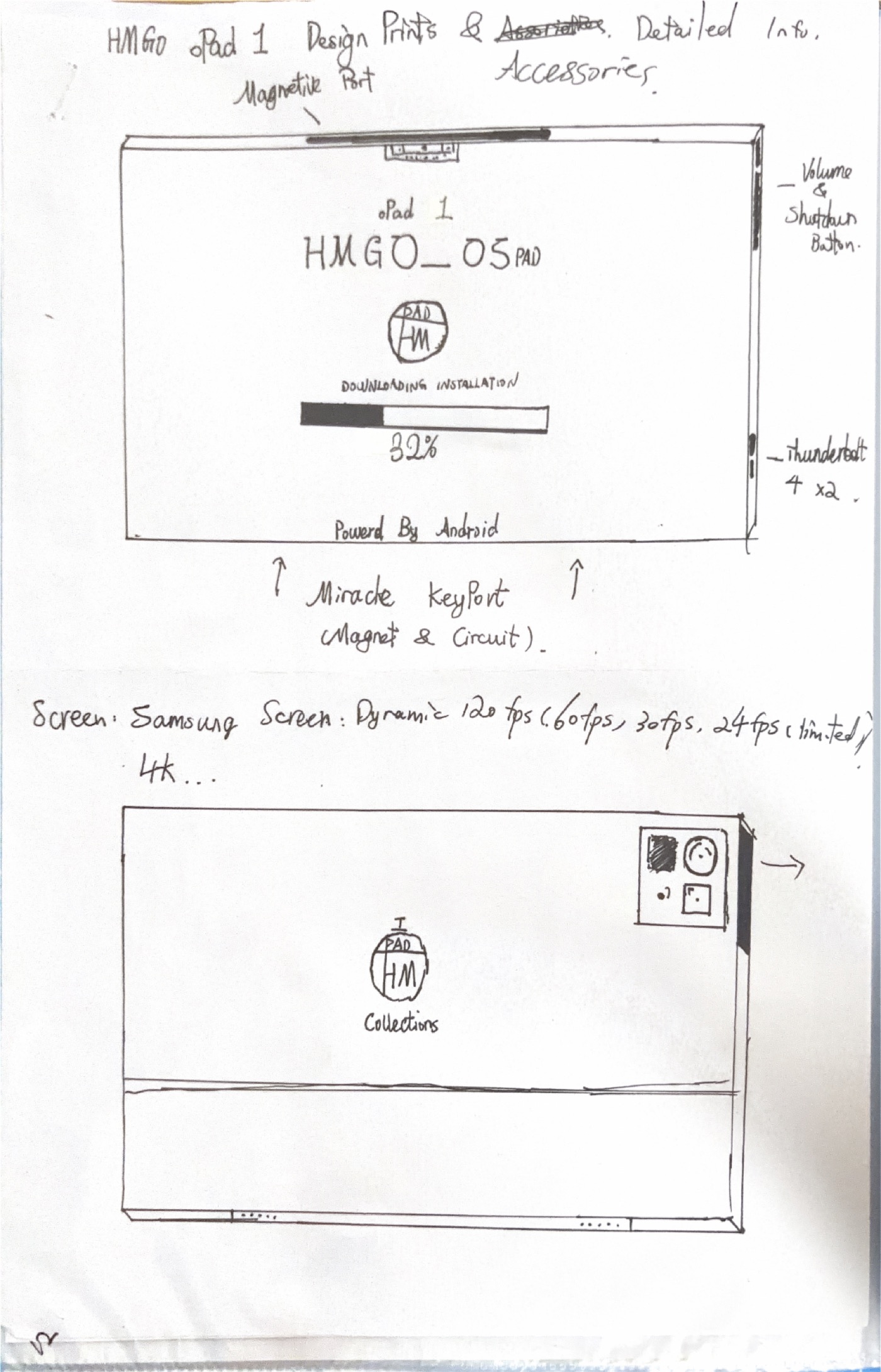
Highlight 01
oPad 1 treats this capability as part of a complete hardware, software and interaction chain. The original design archive is translated into a coherent product system while leaving room for engineering validation and future revisions.
Highlight 02
oPad 1 treats this capability as part of a complete hardware, software and interaction chain. The original design archive is translated into a coherent product system while leaving room for engineering validation and future revisions.
Highlight 03
oPad 1 treats this capability as part of a complete hardware, software and interaction chain. The original design archive is translated into a coherent product system while leaving room for engineering validation and future revisions.
Deep dive 01
Windows, timelines, tools and gesture areas are positioned for a large display. Connecting a keyboard reveals desktop shortcuts; picking up a pen gives the canvas more room automatically.
Deep dive 02
The display adjusts to reading, film, drawing and editing while reference colour modes help projects maintain a consistent appearance across HMGO devices.
Deep dive 03
HMGO_OS Pad organises notes, classes, artwork, video and messages around projects. Local intelligence handles search and organisation, while oCloud continuity remains optional.
Technical Specifications
* This is an HMGO concept product archive. Details not clearly marked in the original PDFs are completed according to the positioning of the same product family. Final hardware, software, pricing and delivery plans remain subject to formal release.
Configure Yours
Select performance, memory, storage, finish and coverage. Every upgrade is reflected in the total immediately.
From ¥7,999View pricingQuestions & Answers
This page presents a complete concept developed from the original design archive. Names, specifications, materials, prices and delivery plans may change after engineering validation.
Clearly legible starting prices and upgrades come from the design documents. Missing or unreadable items are completed using the same product family's capacity, performance and service structure, and are labelled as conceptual pricing.
Yes. Open the Pricing & Configuration page for oPad 1 to select performance, memory, storage, finish and coverage while the conceptual total updates immediately.
Yes. The product archive remains on the page, and legible structures, interfaces and options are rewritten as clearer web content without presenting uncertain details as released facts.